
Assign HR module permissions
4 min read
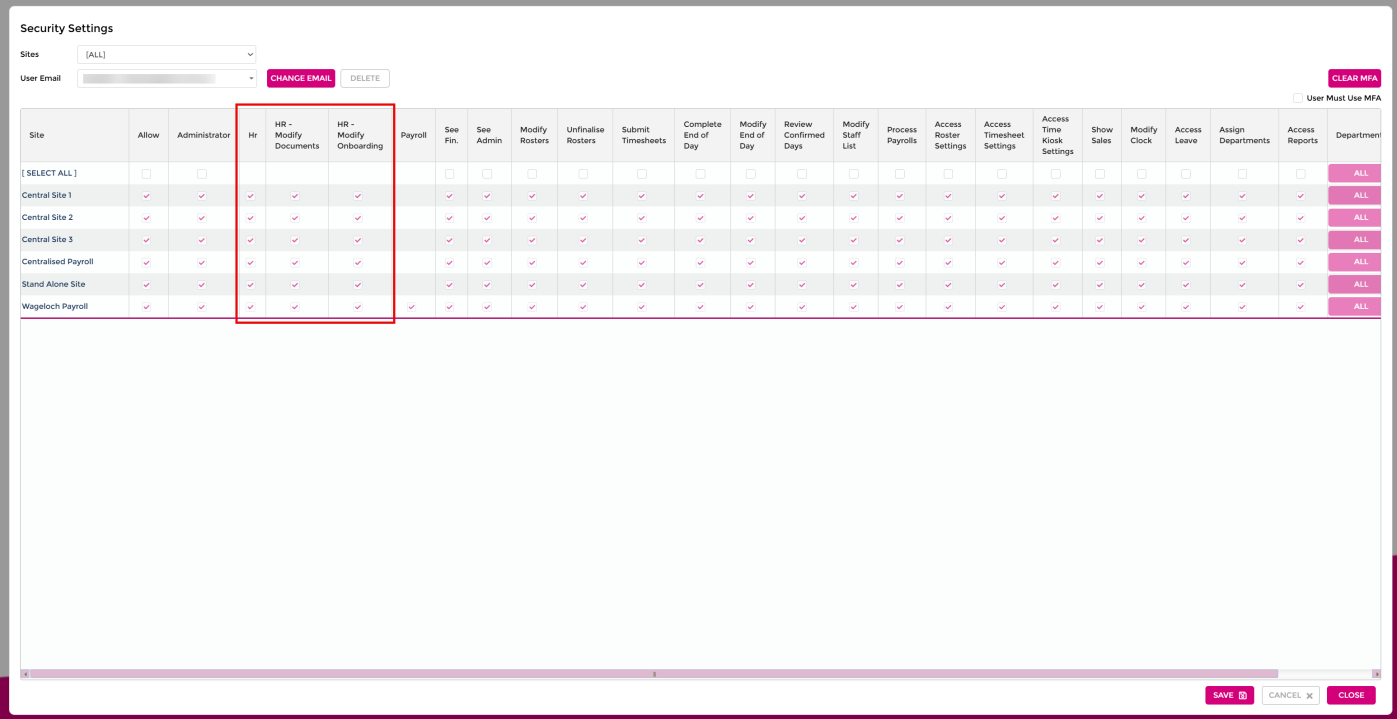
The HR module splits access into three separate permissions instead of one all-or-nothing HR checkbox: HR, HR - Modify Documents, and HR - Modify Onboarding. Together they decide whether a user can only view HR documents and onboarding workflows, or also create, edit, and delete them. For the full permission grid, see User permissions.
Default permission state
After release, all three permissions are enabled by default for every client. A Super Admin needs to change a user's permissions individually to restrict them to read-only or partial access.
Before you start
- Confirm the user needs access to the HR module at all.
- Decide whether the user manages HR documents, onboarding workflows, or both.
- Decide whether the user should only view existing content, or also create, edit, and delete it.
Assign the permissions
- Open Settings.
- Select Security.
- Create a new user, or open an existing user.
- Enable HR to grant access to the HR module. This automatically enables HR - Modify Documents and HR - Modify Onboarding.
- Disable HR - Modify Documents if the user should only have read-only access to HR documents, including contracts and policies.
- Disable HR - Modify Onboarding if the user should only have read-only access to onboarding workflows, custom fields, and custom placeholders.
- Compare the resulting combination against the table below.
- Select Save.
What each permission combination allows
| Function | HR only | + HR - Modify Documents | + HR - Modify Onboarding | All three enabled |
|---|---|---|---|---|
| Access the HR module | Yes | Yes | Yes | Yes |
| Create, edit, or delete HR documents | No – read-only | Yes | No – read-only | Yes |
| Send HR documents directly | Yes | Yes | No | Yes |
| Create, edit, or delete onboarding workflows | No – read-only | No – read-only | Yes | Yes |
| Send onboarding workflows | Yes | Yes | Yes | Yes |
| Create, edit, or delete custom fields and placeholders | No – read-only | No – read-only | Yes | Yes |
Permission behaviour notes
- HR - Modify Documents controls create, edit, and delete access to HR documents such as contracts and policies. Without it, HR documents are read-only.
- HR - Modify Onboarding controls create, edit, and delete access to onboarding workflows, custom fields, and custom placeholders. Without it, these areas are read-only.
- A user with HR module access can send onboarding workflows in all four scenarios.
- A user with HR - Modify Onboarding but not HR - Modify Documents can send an HR document as part of an onboarding workflow, but cannot send an HR document directly.
Troubleshooting
- The user cannot access the HR module. Confirm HR is enabled — the two modify permissions do not grant module access by themselves.
- The user can view HR documents but cannot edit them. Confirm HR - Modify Documents is enabled. Without it, HR documents are read-only.
- The user cannot send an HR document directly. Check whether only HR - Modify Onboarding is enabled. In that scenario, the user can send onboarding workflows but not an HR document directly.
- The user can send a document through onboarding but not directly. This is expected when HR - Modify Onboarding is enabled and HR - Modify Documents is not.
- The user cannot edit an onboarding workflow. Confirm HR - Modify Onboarding is enabled. Without it, onboarding workflows are read-only.
- The user cannot create or edit custom fields or custom placeholders. Confirm HR - Modify Onboarding is enabled — it also controls custom fields and placeholders.
- The user has read-only access but can still send HR documents. This is expected when only HR is enabled, with neither modify permission on.