
Settings
1 min read
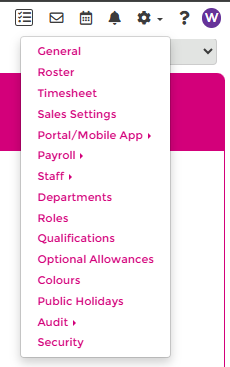
Settings
Use this hub to navigate the Settings area and keep your configuration aligned with how your business operates.
INFO
Some settings areas — including Payroll — may only be accessible from a central payroll site if your site is managed under one. See Central Payroll.
Quick links
- General
- Rosters
- Timesheet
- Sales Settings
- Portal Setup
- Payroll
- Staff
- Departments
- Roles
- Qualifications
- Optional Allowances
- Colours
- Public Holidays
- Audit
- Security
When to review settings
Most settings are configured once and then reviewed as your business changes. Revisit these topics regularly:
- update Public Holidays each year
- maintain team structure in Departments
- update position coverage in Roles
- manage administrator access in Security
Your implementation manager will usually help set these up during onboarding, and you can update them at any time as requirements change.
Need help?
If you are not sure which setting to use, contact the Wageloch Helpdesk.
General settings
Configure business identity, display preferences, wage tracking, and mobile clocking defaults.
Staff settings
Configure staff imports, accrual imports, staff location controls, and onboarding defaults.
Roster settings
Configure roster publishing, budgets, printing, and advanced roster controls.
Timesheet settings
Configure timesheet behaviour, automatic pay methods, rounding rules, and summary printing.
Payroll settings
Configure payroll connections, mappings, and Wageloch Payroll options.
Public holiday settings
Manage public holiday behaviour, sync the latest holiday list, and maintain local holiday dates.
Colour settings
Configure colour behaviour for shifts, departments, roles, qualifications, and overtime alerts.