
Qualifications
2 min read
Qualifications
Open Qualifications to review your recorded qualifications and manage your certificates.
This screen separates required qualifications and optional qualifications.
Before you start
For security, you must authenticate with your PIN or biometric login before you can view qualifications. This is the same authentication used for My Profile.
INFO
Uploading a certificate is only available if your employer uses the Wageloch HR module. Viewing your recorded qualifications does not require the HR module.
Open Qualifications
- Go to the Quick Actions section on Home.
- Tap Qualifications.
- Authenticate with your PIN or biometric login when prompted.
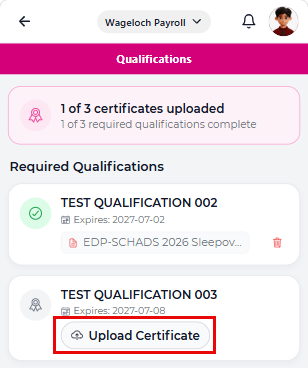
From this screen, you can:
- See how many certificates have been uploaded.
- Check how many required qualifications are complete.
- Upload a certificate.
- Remove a certificate.
NOTE
Where your manager has uploaded a certificate or supporting file on your behalf, it also appears on the qualification record.
Upload a certificate
- Open Qualifications.
- Find the qualification you want to update.
- Tap Upload Certificate.
- Select a PDF file from your device.
- Enter the Date attained and expiry date for the certificate.
- Tap Upload.
INFO
Only PDF files are accepted on this screen.